
Deployment
- Ant Migration Tool End of Life
With Spring ’24, the Ant Migration Tool is being retired. The tool is still working for next API versions, but it isn’t supported or updated with new features. For a supported, up-to-date developer experience, use Salesforce CLI to manage modifications to the metadata.
Development
- Lightning Components
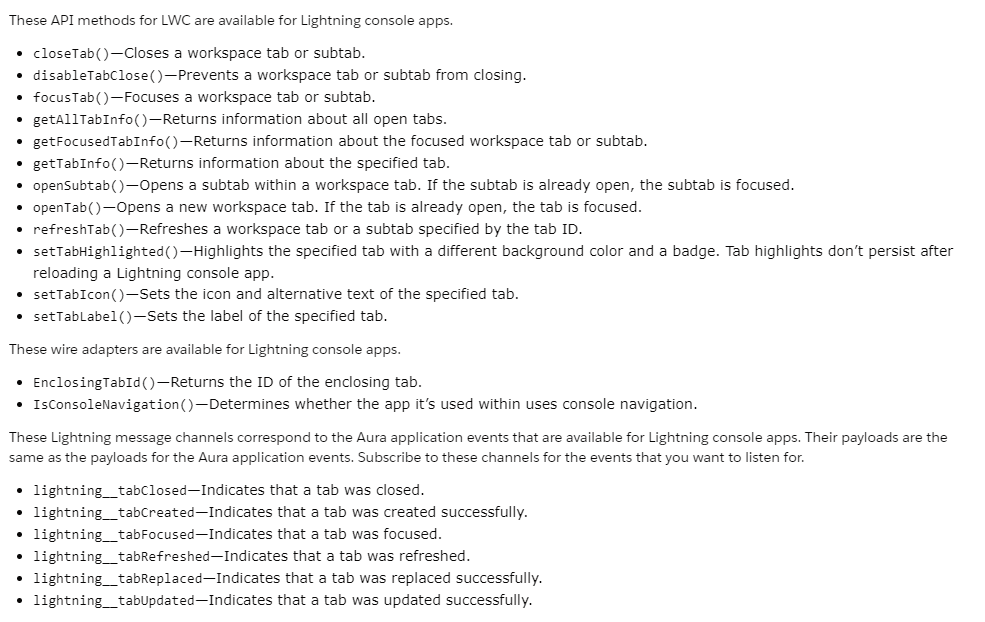
[A] Control Workspace Tabs and Subtabs (Generally Available)
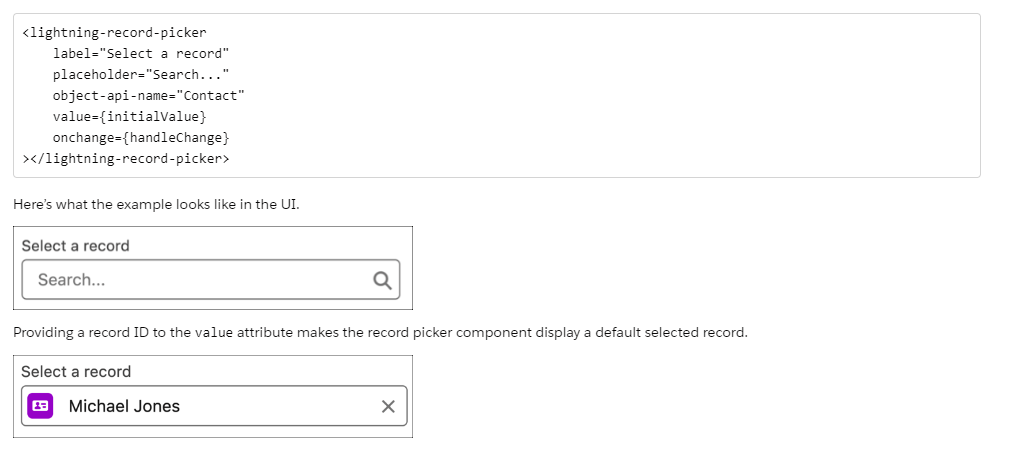
[B] Search for Records with the Lightning Record Picker Component (Generally Available)
[C] Monitor Component Events with Custom Component Instrumentation API (Generally Available)
Your Lightning web components will become more observable when you use the Custom Component Instrumentation API. Use custom Lightning web components to directly monitor and track events or interactions within your organization’s Event Monitoring system. In the past, page performance and records loaded were the only aspects of your program that were tracked by event monitoring solutions. Since the beta release, the Custom Component Instrumentation API has undergone a change and is now generally available. Logs from custom components are now viewable in the browser console. Aura components are not supported by the Custom Component Instrumentation API, which is intended for Lightning web components.
Note: This change is available to customers who purchased Salesforce Shield or Salesforce Event Monitoring add-on subscriptions.
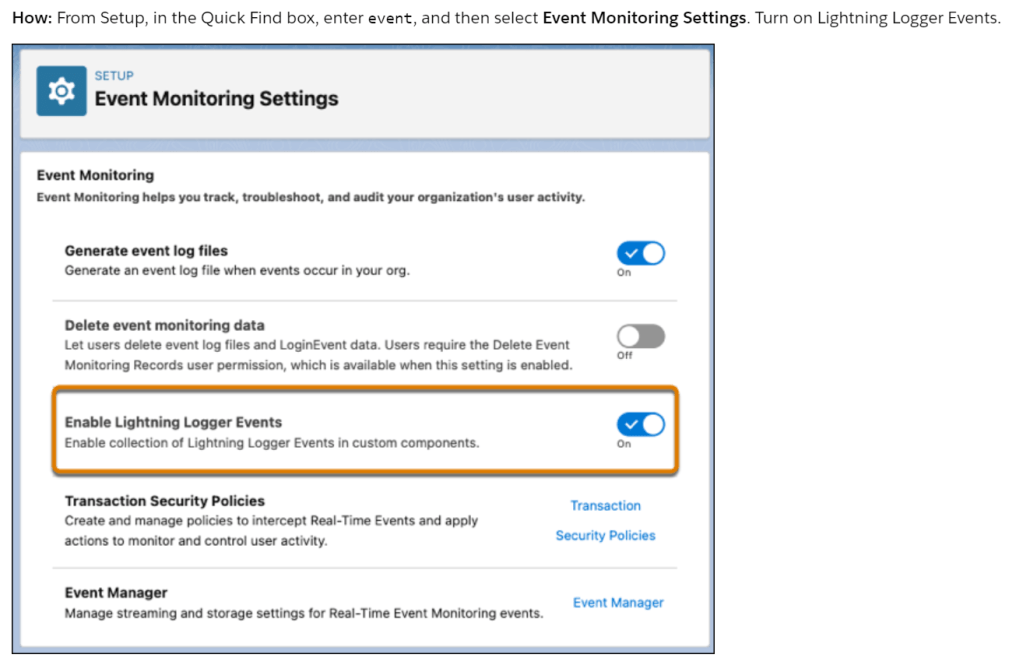
After that, import logs into Event Monitoring by logging data messages from the lightning/logger module in your component. In order to format the event data for usage in event monitoring, the log() function publishes data to a new EventLogFile event type called Lightning Logger Event.
<!-- logger.html -->
<template>
    <lightning-card
            title="Spring'24 Release Feature - Logger"
            icon-name="action:new_custom14">
        <div class="slds-box">
            <lightning-button
                    variant="brand"
                    label="Approve"
                    onclick={handleClick}>
            </lightning-button>
        </div>
    </lightning-card>
</template>
// logger.js
import { LightningElement } from 'lwc';
import { log } from 'lightning/logger';

export default class Logger extends LightningElement {

   // public property
   msg = {
      type: "click",
      action: "Approve"
      }

   // private property

   // lifeCycle Hook
   constructor() {
        super();
       }

   // handleClick - function
   handleClick() {
        log(msg);
    }

}
Visualforce
- Enable JsonAccess Annotation
JavaScript is used by the Visualforce Remoting API to enable direct calls from Visualforce sites to Apex controller methods. This update verifies the JsonAccess annotation on your Apex classes to stop unwanted serialization and deserialization across packaging namespaces. First released in the winter of 23 and going into effect in the spring of 24, this update
Note: This has been Enforced in: Spring ’24.
Apex
[A] Use the Null Coalescing Operator
Recap: Before this feature…
public with sharing class NullCoalescingOperator_Spring24 {

    public static void check_NullCoalescingOperator() {
        Account a = [SELECT Id FROM Account WHERE Name = 'Not Available'];
        System.debug('Account => ' + a);
    }
}
The code sample mentioned above will throw below System.Query Error
Error on line 12, column 1: System.QueryException: List has no rows for assignment to SObject
Class.NullCoalescingOperator_Spring24.check_NullCoalescingOperator: line 12, column 1
AnonymousBlock: line 1, column 1
AnonymousBlock: line 1, column 1
We can now handle this case with the Null Coalescing Operator in the Spring’24 release. While Apex allows the assignment of a single resultant record from a SOQL query, it will raise an exception in the event that the query returns no rows. When a query returns no rows, it can be handled graciously with the null coalescing operator. Please review the code sample below.
public with sharing class NullCoalescingOperator_Spring24 {

    public static void check_NullCoalescingOperator() {
        // Return this account if Account Type isn't null
        Account findThisAccount = new Account(Name = 'Cloud Sfdc');

        Account acc1_IsNull = [SELECT Name FROM Account WHERE Name = 'Not Available'] ?? findThisAccount;
        System.debug('acc1_IsNull is True, so returning findThisAccount => ' + acc1_IsNull);

        Account acc2_IsNull = [SELECT Name FROM Account WHERE Name = 'Edge Communications'] ?? findThisAccount;
        System.debug('acc2_IsNull is False, so returning Edge Communications => ' + acc2_IsNull);
    }
}
Executing:
===============================================================
NullCoalescingOperator_Spring24.check_NullCoalescingOperator();
===============================================================
Success.

07:58:11.65 (91010000)|USER_DEBUG|[16]|DEBUG|acc1_IsNull is True, so returning findThisAccount => Account:{Name=Cloud Sfdc}

07:58:11.65 (97420780)|USER_DEBUG|[19]|DEBUG|acc2_IsNull is False, so returning Edge Communications => Account:{Name=Edge Communications, Id=0011Q00002bMqjUQAS}
[B] Make Callouts After Rolling Back DML and Releasing Savepoints
Using a savepoint, undo all DML that hasn’t been committed. Use the new Database after that.To release savepoints explicitly before to sending the desired callout, use the releaseSavepoint method. In the past, callouts made after savepoint creation produced a CalloutException regardless of whether uncommitted DML was present or the modifications were rolled back to a savepoint.
Roll back all savepoints and release them explicitly to enable callouts. In this case, the uncommitted DML is rolled back and the savepoint is released, which means that the makeACallout() callout is successful.
Savepoint sp = Database.setSavepoint();
try {
// Try a database operation
insert new Account(name='Cloud Sfdc');
integer divideByZero = 1 / 0;
} catch (Exception ex) {
Database.rollback(sp);
Database.releaseSavepoint(sp); // Also releases any savepoints created after 'sp'
makeACallout(); // Callout is allowed because uncommitted work is rolled back and savepoints are released
}
When Database.releaseSavepoint() is called, SAVEPOINT_RELEASE is logged if savepoints are found and released.
When Test.startTest() and Test.stopTest() are executed, all savepoints for Apex tests using API version 60.0 or later are released. If any savepoints are reset, an event called SAVEPOINT_RESET is recorded.
[C] See Improved Logging When FOR UPDATE Locks Are Released
When a callout is made, record locks that were acquired in Apex via FOR UPDATE are instantly released. The most recent locked object type is included in the information that has been logged in the debug log. Take FOR_UPDATE_LOCKS_RELEASE, for instance, which releases locks as a result of a callout. Account was the most recent lock.
Summary
The features of the Salesforce Spring ’24 release are documented in the Release Notes.
 Salesforce Training
Leave a comment